Showing posts with label SQL. Show all posts

Tuesday, July 08, 2014

Get Month part from date

The following sql queries can give month part from date:

SELECT DATEPART(MONTH, GETDATE()) AS [month]
SELECT DATEPART(MM, GETDATE()) AS [month]
SELECT DATEPART(M, GETDATE()) AS [month]

| month |
|   7   |

The following sql queries can give month (mm) from date:

SELECT RIGHT('00' + CAST(DATEPART(MONTH, GETDATE()) AS VARCHAR(2)),2) AS [month]
SELECT RIGHT('00' + CAST(DATEPART(MM, GETDATE()) AS VARCHAR(2)),2) AS [month]
SELECT RIGHT('00' + CAST(DATEPART(M, GETDATE()) AS VARCHAR(2)),2) AS [month]

| month |
|   07  |

The following sql queries can give month name from date:

SELECT DATENAME(MONTH, GETDATE()) AS [month]
SELECT DATENAME(MM, GETDATE()) AS [month]
SELECT DATENAME(M, GETDATE()) AS [month]

| month |
|  July |

The following queries gives month name(mmm) from date:

SELECT LEFT(DATENAME(MONTH, GETDATE()),3) AS [month]
SELECT LEFT(DATENAME(MM, GETDATE()),3) AS [month]
SELECT LEFT(DATENAME(M, GETDATE()),3) AS [month]

| month |
|  Jul  |


Get Year part from date

The following sql queries can give year part in a date in YYYY format:

SELECT DATEPART(YEAR, GETDATE()) AS [year]
SELECT DATEPART(YYYY, GETDATE()) AS [year]
SELECT DATEPART(YY, GETDATE()) AS [year]

| year |
| 2014 |

The following sql queries can give year part in a date in YY format:

SELECT RIGHT(DATEPART(YEAR, GETDATE()), 2) AS [year]
SELECT RIGHT(DATEPART(YYYY, GETDATE()), 2) AS [year]
SELECT RIGHT(DATEPART(YY, GETDATE()), 2) AS [year]

| year |
|  14  |

The following query gives day of year:

SELECT DATEPART(Y, GETDATE())AS [day of year]

| day of year|
|    190     |
(09th July 2014)

Dividing 2 numbers in sql result in either Integer, float, decimal

Dividing 2 numbers in sql gives different results based on their datatypes
When an integer is divided by another integer then result will be integer
When a float is divided by another integer or vice verse or 
a float number is divided by another float number then result will be float.
The following queries shows the differences:
 
SELECT 5   / 10   AS INTQTY --0
SELECT 5   / 10.0 AS DECQTY --0.500000
SELECT 5.0 / 10   AS DECQTY --0.500000
SELECT 5.0 / 10.0 AS DECQTY --0.500000
 
SELECT CONVERT(DECIMAL(16, 2), 5   / 10  ) AS INTQTY --0.00
SELECT CONVERT(DECIMAL(16, 2), 5   / 10.0) AS INTQTY --0.50
SELECT CONVERT(DECIMAL(16, 2), 5.0 / 10  ) AS INTQTY --0.50
SELECT CONVERT(DECIMAL(16, 2), 5.0 / 10.0) AS INTQTY --0.50
 
SELECT CAST(5   / 10   AS DECIMAL(16, 2)) AS INTQTY --0.00
SELECT CAST(5   / 10.0 AS DECIMAL(16, 2)) AS INTQTY --0.50
SELECT CAST(5.0 / 10   AS DECIMAL(16, 2)) AS INTQTY --0.50
SELECT CAST(5.0 / 10.0 AS DECIMAL(16, 2)) AS INTQTY --0.50


Monday, July 07, 2014

SQL BASICS

GO : 

GO is not a Transact-SQL statement; it is a command recognized by the sqlcmd and osql utilities and SQL Server Management Studio Code editor.

SQL Server utilities interpret GO as a signal that they should send the current batch of Transact-SQL statements to an instance of SQL Server. 

The current batch of statements is composed of all statements entered since the last GO, or since the start of the ad hoc session or script if this is the first GO.

(SQL Server applications can send multiple Transact-SQL statements to an instance of SQL Server for execution as a batch. The statements in the batch are then compiled into a single execution plan.

Programmers executing ad hoc statements in the SQL Server utilities, or building scripts of Transact-SQL statements to run through the SQL Server utilities, use GO to signal the end of a batch.)


A Transact-SQL statement cannot occupy the same line as a GO command. However, the line can contain comments.

Users must follow the rules for batches. For example, any execution of a stored procedure after the first statement in a batch must include the EXECUTE keyword. 

The scope of local (user-defined) variables is limited to a batch, and cannot be referenced after a GO command.

source:

Thursday, July 03, 2014

PIVOT and UNPIVOT in Sql Server

This article provides introduction to the PIVOT and UNPIVOT relational operators introduced in Sql Server 2005 with extensive list of examples.

PIVOT

PIVOT is one of the New relational operator introduced in Sql Server 2005. It provides an easy mechanism in Sql Server to transform rows into columns.
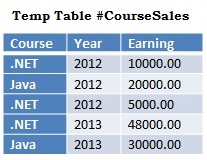
To understand PIVOT with extensive list of examples, let us first create a Temporary Table #CourseSales with sample records as depicted in the below image by using the following script:
Table to be Pivoted in Sql
--Create Temporary Table #CourseSales
CREATE TABLE #CourseSales
(Course VARCHAR(50),Year INT,Earning  MONEY)
GO
--Populate Sample records
INSERT INTO #CourseSales VALUES('.NET',2012,10000)
INSERT INTO #CourseSales VALUES('Java',2012,20000)
INSERT INTO #CourseSales VALUES('.NET',2012,5000)
INSERT INTO #CourseSales VALUES('.NET',2013,48000)
INSERT INTO #CourseSales VALUES('Java',2013,30000)
GO

Example 1:

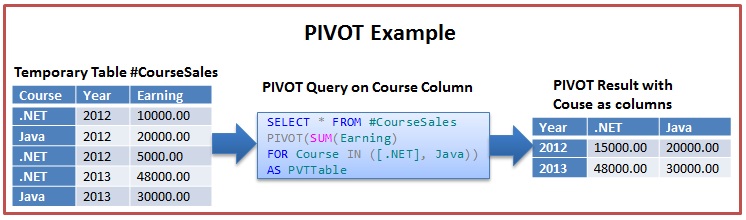
In this example the #CourseSales Table data is Pivoted so that the Course becomes the column headings.
Pivot Example 1 In Sql Server
Below script pivots the #CourseSales Table data so that the Course columns distinct values are transformed as Columns in the result set as depicted in the above image.
SELECT *
FROM #CourseSales
PIVOT(SUM(Earning)
      FOR Course IN ([.NET], Java)) AS PVTTable

Example 2:

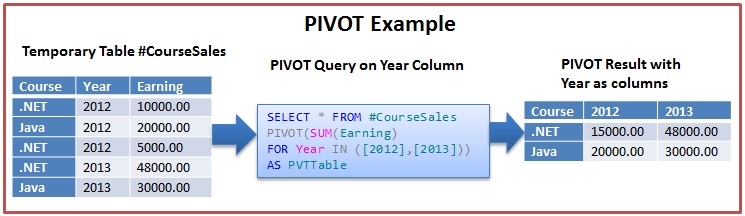
In this example the #CourseSales Table data is Pivoted so that the Year becomes the column headings.
Pivot Example 2 In Sql Server
Below script pivots the #CourseSales Table data so that the Year columns distinct values are transformed as Columns in the result set as depicted in the above image.
SELECT *
FROM #CourseSales
PIVOT(SUM(Earning)
      FOR Year IN ([2012],[2013])) AS PVTTable

Example 3:

Transforming Sales Table data to a Quarterly aggregated sales data with Quarters as the Columns in the result set.
Pivot Example 3 In Sql Server
Let us create a Temporary Sales table and insert 1000 Sample Sales Records With Random past 0-1000 days as the sales date by using the below script.
--Create Temporary Sales Table
CREATE TABLE #Sales
(SalesId INT IDENTITY(1,1), SalesDate DateTime)
GO
--Populate 1000 Sample Sales Records With
--Random past 0-1000 days as sales date
INSERT INTO #Sales(SalesDate)
VALUES(DATEADD(dd, - CONVERT(INT, (1000+1)*RAND()),GETDATE()))
GO 1000
Now we can write a query like below which Pivots the Sales Table Data such that the quarters are the columns in the final result set as depicted in the above image.
SELECT Year, QPivot.[1] As Q1, QPivot.[2] As Q2,
 QPivot.[3] As Q3, QPivot.[4] As Q4
FROM (SELECT YEAR(SalesDate) [Year],
     DATEPART(QUARTER, SalesDate) [Quarter],
         COUNT(1) [Sales Count]
      FROM #Sales
      GROUP BY YEAR(SalesDate),
         DATEPART(QUARTER,SalesDate)) AS QuarterlyData
PIVOT( SUM([Sales Count])  
        FOR QUARTER IN ([1],[2],[3],[4])) AS QPivot

Example 4:

Transforming Sales Table data to a Monthly aggregated sales data with Months as the Columns in the result set.
Monthly Data Using Pivot In Sql Server 2005
We can write a PIVOT query like below to get the Monthly Data as depicted in the above image.
SELECT *
FROM (SELECT YEAR(SalesDate) [Year],
       DATENAME(MONTH, SalesDate) [Month],
       COUNT(1) [Sales Count]
      FROM #Sales
      GROUP BY YEAR(SalesDate),
      DATENAME(MONTH, SalesDate)) AS MontlySalesData
PIVOT( SUM([Sales Count])  
    FOR Month IN ([January],[February],[March],[April],[May],
    [June],[July],[August],[September],[October],[November],
    [December])) AS MNamePivot

UNPIVOT

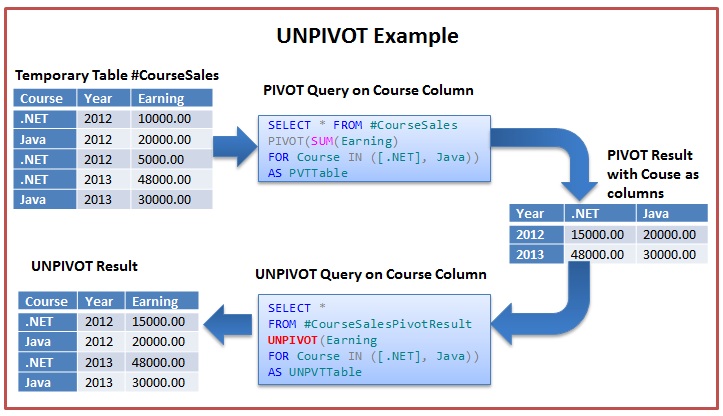
UNPIVOT is the reversal of the PIVOT operation. It basically provides a mechanism for transforming columns into rows.
UNPIVOT Example in Sql Server
From the above image it is clear that UNPIVOT is the reversal of the PIVOT operation. But it is not the exact reversal of PIVOT operation as PIVOT operation generates the aggregated result, so UNPIVOT will not be able to split the aggregated result back to the original rows as they were present prior to the PIVOT operation.
As depicted in the above image there were 5 rows in the #CourseSales Table Prior to PIVOT, but a PIVOT and it’s reversal UNPIVOT resulted in 4 rows only. The reason for this is for .NET Course in Year 2012 there were two records one with earning 10K and another with earning 5K, the PIVOT and it’s reversal UNPIVOT result last lost this split information and instead of two rows it has generated one row for the .NET course in Year 2012 with Earning as sum of 10K and 5K i.e. 15K.
We can use the below script to simulate the PIVOT and UNPIVOT operation as depicted in the above image on the #CourseSales Temporary Table created in the beginning PIVOT section of this article.
--PIVOT the #CourseSales table data on the Course column
SELECT *
INTO #CourseSalesPivotResult
FROM #CourseSales
PIVOT(SUM(Earning)
      FOR Course IN ([.NET], Java)) AS PVTTable
GO
--UNPIVOT the #CourseSalesPivotResult table data
--on the Course column   
SELECT Course, Year, Earning
FROM #CourseSalesPivotResult
UNPIVOT(Earning
      FOR Course IN ([.NET], Java)) AS UNPVTTable